How to Use the Metro in China: QR Codes, Apps & What Works for Foreigners
On this page
The metro is the best way around Chinese cities — cheap, fast, air-conditioned, and signposted in English in every big city. The one thing that trips people up is paying for it, because China has almost entirely dropped cash and physical cards in favour of a QR code on your phone. The good news: as a foreigner you can be set up before you even land, and once it works, it works city after city.
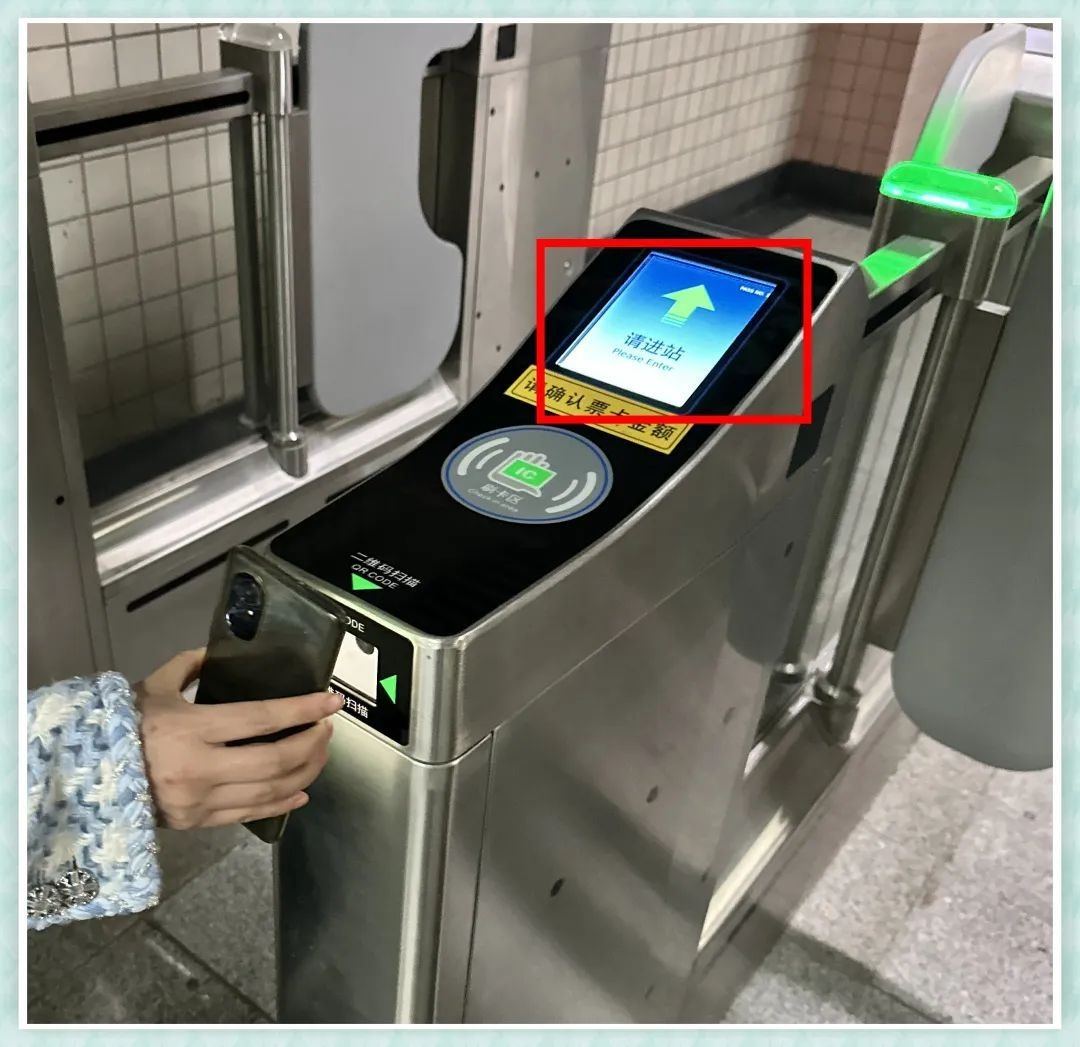
The 30-second answer
- You don’t need a physical card. Set up Alipay or WeChat before you fly and scan a QR code at the gate.
- Link a Visa or Mastercard to Alipay or WeChat — no Chinese bank account needed.
- Activate the ride code separately for each city — it takes about a minute.
- Turn off your VPN before you scan; it can block the payment.
- A single-journey ticket always works as a fallback, but machines often take cards or mobile only, not cash.
Four ways through the gate
| Method | What it is | Works for foreigners? |
|---|---|---|
| Alipay transport code | A QR code in the Alipay app (出行 / “Transport”) | Yes — link an international card; covers 30+ cities |
| WeChat 乘车码 | A QR code in a WeChat mini-program | Yes — foreign cards supported since 2024; most cities |
| Tap a foreign card | Tap Visa/Mastercard directly at the gate | Yes, but only Beijing, Shanghai, Guangzhou, Chengdu and some lines |
| Single-journey ticket | Buy at a machine or a staffed counter | Always — but machines may be card/mobile only |
For most visitors the answer is the same: set up Alipay, use its transport code, and keep the single ticket as a backup.
Which cities work
Alipay and WeChat ride codes now work with foreign cards in essentially every city a visitor is likely to reach. If a city has a metro, one of the two almost always covers it. The table below is the short version for the places most people go; coverage keeps expanding, so the app is the final word.
| City | Alipay | Direct card tap | |
|---|---|---|---|
| Beijing | ✓ | ✓ | ✓ (some lines) |
| Shanghai | ✓ | ✓ | ✓ |
| Guangzhou | ✓ | ✓ | ✓ |
| Shenzhen | ✓ | ✓ | — |
| Chengdu | ✓ | ✓ | ✓ (some lines) |
| Xi’an | ✓ | ✓ | — |
| Hangzhou | ✓ | ✓ | — |
| Nanjing · Wuhan · Tianjin | ✓ | ✓ | — |
Two honest caveats: in a handful of smaller cities the transit code may still ask for a Chinese bank account, and “tap a foreign card” is a newer feature that isn’t everywhere yet. That’s exactly why the single-journey ticket stays in your back pocket.
Set up Alipay’s transport code
This is the one we recommend for most people, because it covers the most cities with the least fuss.
- Download Alipay and register with your home phone number — international numbers work.
- Add an international card (Me → Bank Cards → Add Card → International Card). Visa, Mastercard, Amex, JCB and Discover are accepted.
- Verify your identity with your passport photo and a quick face scan. This raises your limits and unlocks the transport code.
- Open “Transport” (出行) and pick your city. The first time, agree to the terms and the app creates a QR code for that city.
- Scan at the gate — on the way in and on the way out. The fare is worked out from the distance and charged automatically.
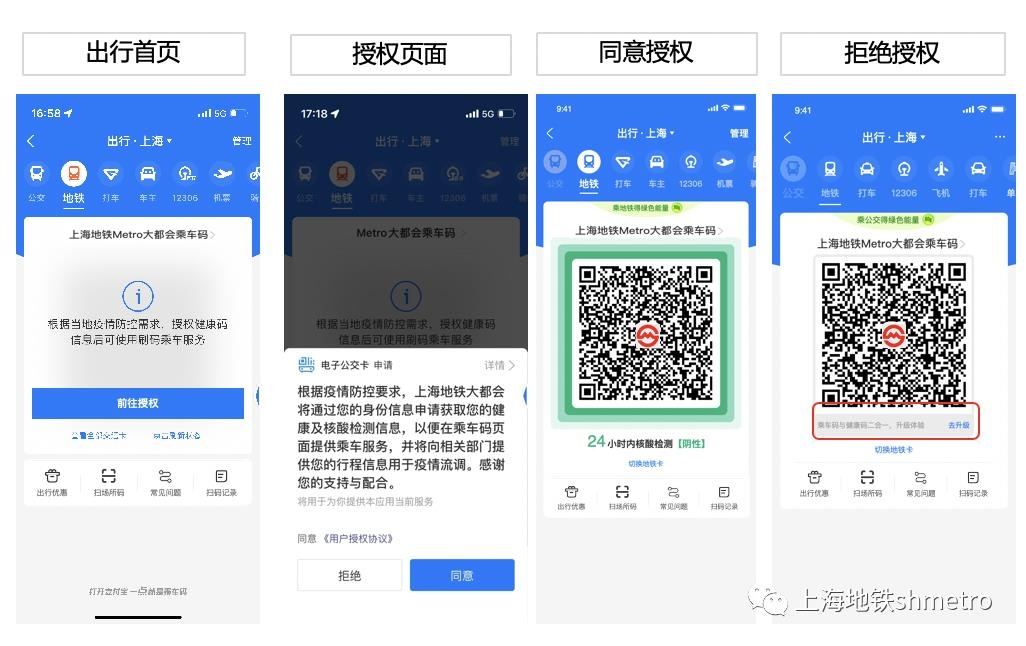
Two things worth knowing: you activate the code once per city (a one-minute step each time you arrive somewhere new), and turn off your VPN before scanning — a VPN can make the payment fail.
Set up WeChat’s 乘车码
If you already live in WeChat (and a lot of visitors do, for messaging), the ride code is right there.
- Add an international card in WeChat (Me → Services → Wallet → Bank Cards). Visa, Mastercard, JCB and Discover work.
- Search “乘车码” in WeChat and open the mini-program.
- Pick your city and follow the prompts to activate its metro and bus code.
- Scan at the gate in and out, same as Alipay.
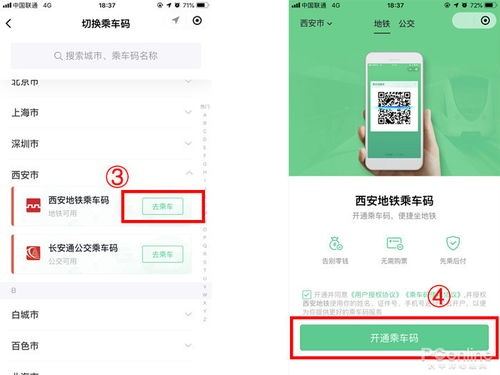
WeChat’s ride code runs on a “ride first, pay later” model, so the fare shows up in your transactions after the trip. Shanghai was the first city to support it for foreign cards; Shenzhen, Hangzhou, Wuhan and Kunming followed, and the list keeps growing.
At the gate, step by step
- Walk to a gate with a glowing QR scanner — most gates have one, usually a small lit panel on the turnstile.
- Turn your screen brightness up and hold your phone to the scanner, a few centimetres away.
- Wait for the beep and the green light, then walk through.
- Scan again when you exit. China’s metros charge by distance, so you tap out the same way you tapped in. If you don’t, you’ll be charged the maximum fare.
If the gate won’t read your phone, a staff member is usually near the gates — show them your screen, or head to the machines for a single-journey ticket.
Common mistakes to avoid
- Leaving your VPN on — it can block the payment mid-gate. Switch it off before you scan.
- Forgetting to activate the new city — the code from one city doesn’t always carry over. Do the one-minute activation when you arrive.
- Trying to pay cash at the machine — many machines take bank cards or mobile only. Have Alipay/WeChat ready, or buy from a staffed counter.
- Letting your phone die — your metro ticket lives on your phone now. Keep a battery pack handy.
- Skipping the exit scan — you’ll be charged the full route instead of your actual fare.
A few phrases to have ready
| English | Chinese | Pinyin |
|---|---|---|
| Where is the metro station? | 地铁站在哪里? | dìtiě zhàn zài nǎlǐ? |
| One ticket to… | 一张到……的票 | yì zhāng dào … de piào |
| How do I use the QR code? | 这个二维码怎么用? | zhège èrwéimǎ zěnme yòng? |
| Is there a staffed ticket counter? | 有人工售票窗口吗? | yǒu réngōng shòupiào chuāngkǒu ma? |
Pre-trip checklist
- Set up Alipay and link a Visa/Mastercard (see the payment guide)
- Complete passport verification so your transport code works
- Get a local SIM or eSIM so the app works on the move (see the connectivity guide)
- Save “地铁站” (metro station) and your hotel address in Chinese
- Remember to turn off your VPN before scanning
Keeping this page accurate
Metro payment methods change fast — cities keep adding foreign-card support, and direct card-tap is rolling out line by line. We keep this page up to date: the date below shows when it was last checked, and we refresh it as the apps change. If you spot something out of date, contact us.
Image credits
Original screenshots and photo provided for tripchinatips.com — Alipay and WeChat ride-code screenshots, and a metro gate scanner.